In the field
Your whole business, right in your pocket
The Asteri app for iPhone and Android gives technicians everything they need on the job and gives owners and office staff the full business on the go. It uses the same account and the same data as the Asteri web app, and it keeps working when the signal drops.
The iPhone and Android apps are in App Store and Google Play review. Included with every Asteri plan.
- Works offline
- Work done without signal is saved and sent once you’re back online
- iPhone and Android
- iPhone and iPad on iOS 16.4 or later, and Android 8 or later
- Field and office
- A focused view for technicians and the full toolkit for the office
- One account
- Same sign-in and same data as the Asteri web app
What the app does
Built for the field. Ready for the office.
Everything in the app runs on the same account and the same records as the Asteri web app. Each person sees only what their permissions allow.
Every job, start to finish
Start a job, mark it en route or arrived, pause it, and complete it. Work through checklists, edit line items, and handle jobs that take more than one visit.
Your day and your directions
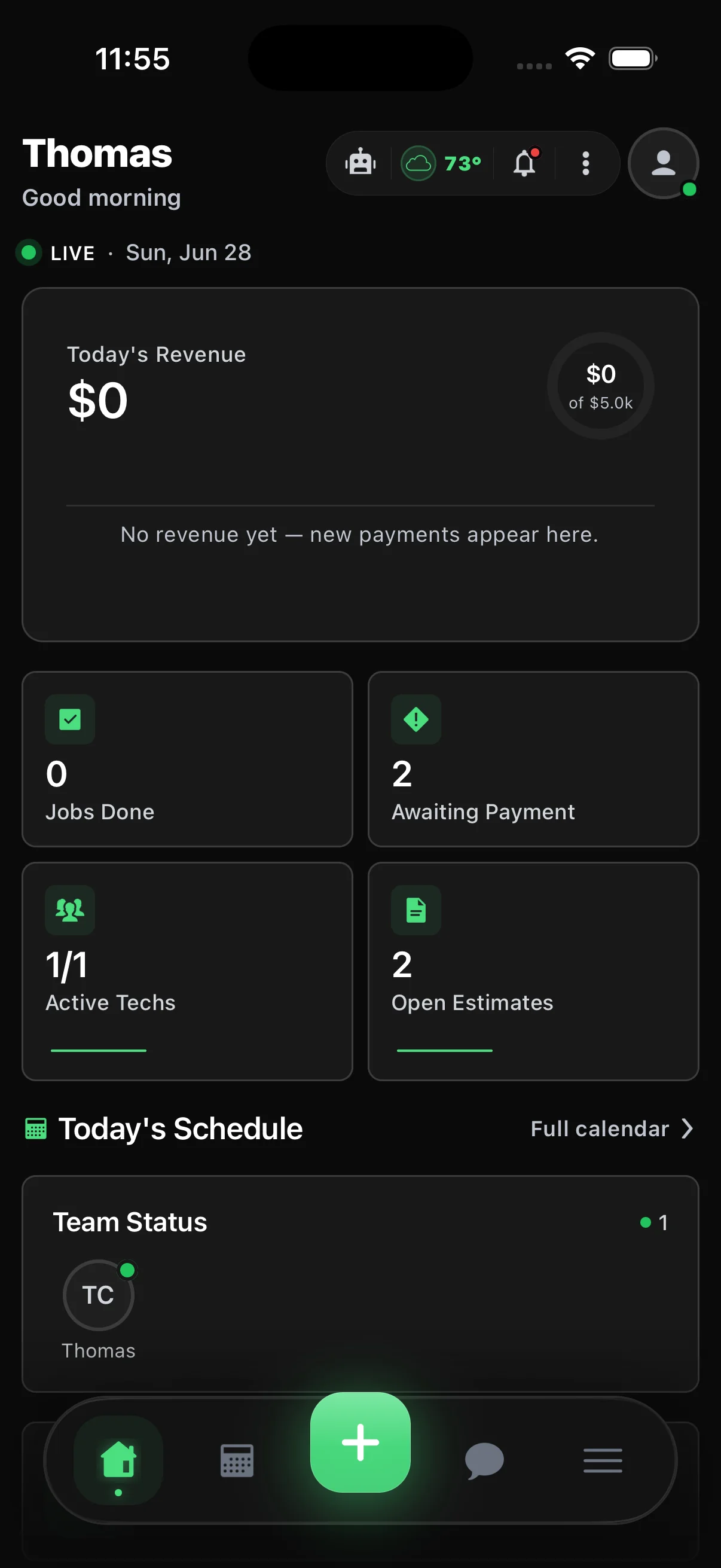
The home screen shows today’s route, the next stop, clock status, and the weather. One tap hands the address to turn-by-turn navigation.
Photos, files, and signatures
Add job photos, files, and voice notes, and build photo reports. Customers sign before and after the job, on the phone or from a text or email link.
Get paid on site
Send a payment link, enter a card with Apple Pay or Google Pay, or record cash, check, Venmo, Zelle, and other payments. Android phones can also use Tap to Pay.
Time clock built in
Clock in and out, take breaks, pick time codes, switch to a job, look back at past hours, and request time off.
Texts, calls, and team chat
A text and picture message inbox with templates, voicemail, a keypad for business calls from the app, and chat with your team.
Scan rooms and stock
Scan rooms on iPhones and iPads with a LiDAR depth sensor, or take reference photos and enter the measurements by hand on other phones. Scan barcodes, check stock levels, and keep purchase orders and vehicle records up to date.
Asteri AI on the go
Floor Inspector reads floor, carpet, rug, and upholstery photos on every plan. A morning brief sums up your day each morning. With the Asteri AI add-on, you can also ask questions and give voice commands.
Made for your phone
Sign in with Face ID, Touch ID, or a fingerprint. Notifications open the right screen, caller ID shows which customer is calling, and updates can arrive without an app store download.
Finish the job on site
Sign, invoice, and get paid before you leave
When the work is done, the customer signs on the phone and your technician wraps up the invoice and payment before driving away.
- Signatures before and after the job, on the phone or by text or email link
- Send the invoice, take payment, or show the invoice on the phone
- Card entry with Apple Pay and Google Pay, plus Tap to Pay on Android phones
- Record cash, check, Venmo, Zelle, and other payments
- Optional quick sales without an invoice, if you turn them on
Finish job
Checklist
All 6 steps done
Photo report
8 before and after photos
Customer signature
SignedSigned on this phone after the job
How do you want to wrap up?
Total
$240.00
Works without signal
No signal? Keep working.
The app keeps your data on the phone. Anything your team does without a connection is saved and sent automatically once they’re back online.
- Job status changes, line items, checklists, and photo reports
- Clocking in and out, new customers, and scans
- Saved work is encrypted for each person and each business
- A Sync screen to retry or remove anything that couldn’t be sent
Sync
No signal right now
Your work is saved on this phone and sends on its own when you’re back online.
Waiting to send · 5
Job marked complete
Dana Whitfield · 10:42 AM
Checklist and line items
Carpet cleaning · 3 rooms
Photo report
8 photos
New customer
Oak Street Dental
Clock out
Couldn’t send
Saved work is encrypted on this phone
For owners and office staff
The office in your pocket
Owners and office staff get the full business in the app, with a bottom bar each person can set up their own way. Permissions decide what everyone sees.
- Dispatch board and a live GPS map of your technicians
- Calendar by month, week, or day, plus estimates, invoices, payments, and payouts
- Customers, leads, sales pipeline, tasks, reports, and booking analytics
- iPhone home-screen widgets: Next Stop, Dispatch Pulse, Cash at Risk, and Team Today
- Live Activities that keep a job on the iPhone lock screen
Dispatch
Alex R.
Heading to Dana Whitfield · 9:00 AM
Maria C.
Oak Street Dental
Dispatch Pulse
2
Jobs to assign
1 running late
3 technicians free
Cash at Risk
$1,860
Overdue
4 invoices
2 estimates waiting
A day in the field
How a technician’s day flows
- 1
Clock in and see the day
The home screen shows today’s route, the next stop, clock status, and the weather.
- 2
Head to the next stop
Mark the job en route and open turn-by-turn directions in one tap. The office sees the update.
- 3
Do the work
Work through the checklist, update line items, and take photos. If there’s no signal, it’s all saved and sent later.
- 4
Wrap up and get paid
Collect the signature, send the invoice or take payment, and move on to the next job.
Questions
Common questions
When can I download the app?
The iPhone and Android apps are in App Store and Google Play review. Once they’re available, existing Asteri teams will be able to sign in with the account they already use. Your business signs up for Asteri on the web, and team members sign in to the app with their Asteri account.
Does the app work without internet?
Yes. The app keeps your data on the phone. Job updates, line items, checklists, photo reports, clocking in and out, new customers, and scans done without signal are saved and sent automatically once you’re back online. If something can’t be sent, the Sync screen lets you retry or remove it.
Which phones does it work on?
iPhone and iPad on iOS 16.4 or later, and Android phones on Android 8 or later. A few features depend on the device: room scans with LiDAR need an iPhone or iPad that has it, and home-screen widgets, Live Activities, and passkeys are on iPhone.
Does the app track my technicians all the time?
No. The app only uses location, including in the background, while someone is clocked in or on an active job, and only after they agree to it.
Can technicians take card payments in the field?
Yes. They can send a payment link, enter a card with Apple Pay or Google Pay, or record cash, check, and other payments. Tap to Pay works on Android phones. On iPhone, use card entry, Apple Pay, or a payment link.
Does it work with the Asteri web app?
Yes. It’s the same account and the same data. What the office changes on the web shows up in the field, and what technicians do in the app shows up on the web.
Do my customers need the app?
No. The app is for your team. Customers approve estimates, pay invoices, and reschedule from the customer portal in any web browser.
Does the app cost extra?
No. The mobile app is included with every Asteri plan. Asteri AI features in the app need the Asteri AI add-on.